A service for running PDCA cycles in-house while understanding physical AI
Physical AI Canvas
Physical AI development, with no-code and AI
Connect robots and cameras to record data, let AI evaluate and tag it, and review and correct the results yourself — all on one screen. The people on the floor can run PDCA cycles in-house and bring physical AI development in-house.
The future of physical AI development
For physical AI data, quality matters as much as quantity
You need to evaluate successes, failures and differences in motion to decide which data to train on. That takes a single, integrated setup from recording through evaluation and labeling.
But building that setup takes effort
Preparing the development and recording setup
Connecting and synchronizing robots and cameras has to be built from scratch.
Preparing the evaluation and labeling setup
Defining evaluation criteria and managing tags also takes work before the data is usable.

With Physical AI Canvas,
develop physical AI with no code.
01Data collection
Collect data easily, with no code
Connect robots and cameras and record motion and video together.
02AI evaluation
AI evaluates and tags automatically
AI evaluates recorded data and adds tags automatically.
03Review & correction
Human corrections are easy on screen
Check the video and analysis, then correct evaluations and tags by hand.
The development flow, from data collection to deployment
01
Record
Capture motion and video in sync
02
Label
Rate success, failure and quality
03
Dataset
Filter and organize by condition
04
Train
Tune the model
05
Deploy
Apply it to the robot
Our goal: development you can keep running on site
Run PDCA cycles in-house and own your development.
Evaluate the data you collect, revisit the conditions and collect again. The people on the floor keep improving, and your own know-how feeds back into development.
Key features of Physical AI Canvas
Point1No-code development
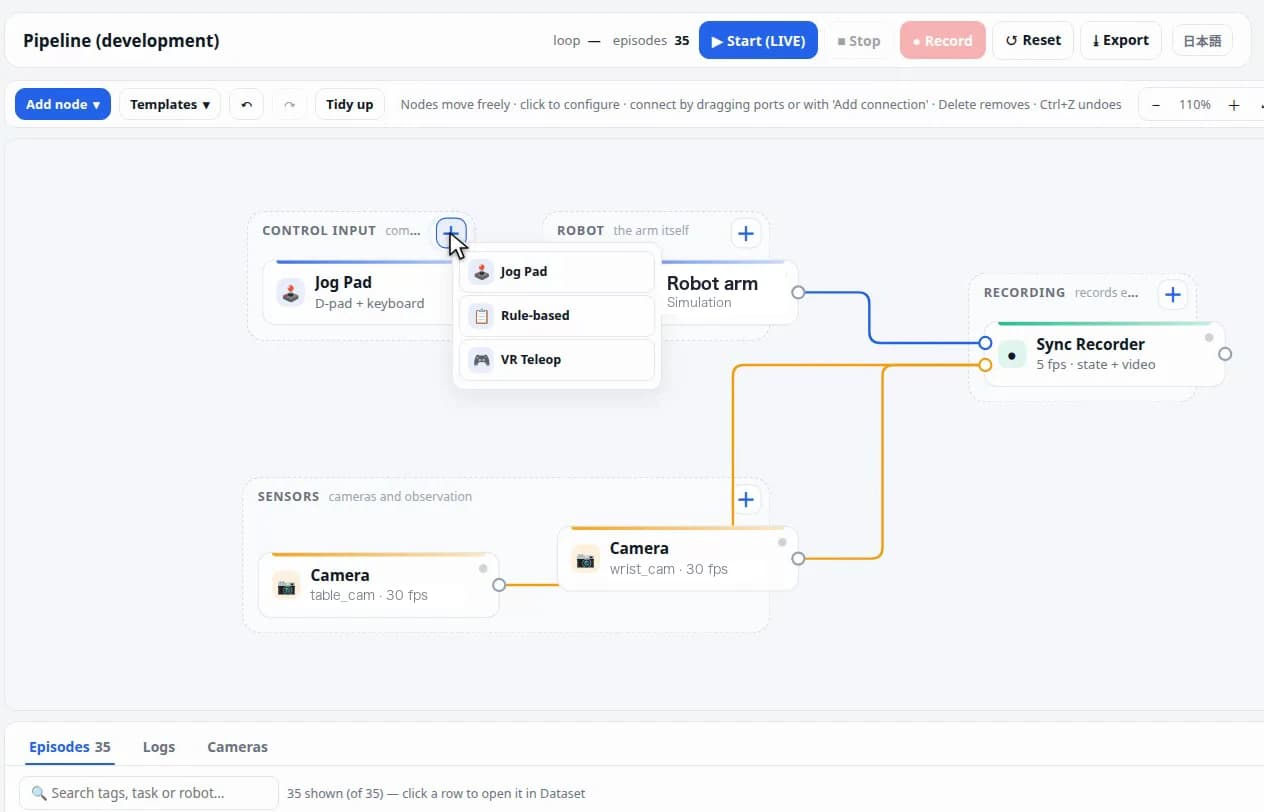
Build the recording setup by connecting nodes
Connect robots, cameras, control devices and recorders as nodes to assemble your recording setup. Meaningless connections are rejected on the spot, so you reach a correct setup without guesswork.
Point2Data visualization
Check AI evaluations and tags, then correct them
AI evaluates recorded data and adds success/failure labels and tags automatically. You can also correct evaluations and tags by hand while reviewing the video and analysis.
Point3Robots and environments
Develop in simulation and on real robots
In simulation, it supports robot models available in URDF/USD format. With real robots, connected devices are detected automatically.
Point4Teleoperation and synced recording
Record motion and video as you operate
Operate the robot with a keyboard, 3D mouse or other device, and record motion and multiple camera feeds in sync — including motion data for training VLA and other models.
Point5AI assistant
Estimates causes of failure and suggests fixes
The assistant estimates the cause of a failure from the analysis data and suggests improvements. It also answers questions about using the tool and about training data.
How adoption works
1
Consultation
We learn about the target task, your robots and cameras, and your site environment.
2
Validation in simulation
Before preparing real hardware, we try the flow from recording to dataset in simulation.
3
Real robot & data collection
We connect your real robots and cameras and collect data on site.
4
Train, deploy, improve
We apply the model trained on your data to the robot and keep improving it based on the results.
Selected collaborations and projects

Press release2026.09.24
Airion Partners with Yazaki Corporation to Enable Self-Driven Physical AI Development on the Factory Floor
Airion is providing Physical AI Canvas to Yazaki. Airion engineers support the first phase, with the goal of Yazaki's own teams running the cycle from data collection and model validation to robot deployment and improvement.
Read the announcement






* Includes contract development projects.
Request a demo / consultation
Feel free to ask for a demo or questions like "Will this work with our robot?"